


A personal brand is not your speaker reel, follower count, or a stream of polished AI summaries. For a developer advocate, it is the trail of evidence that you can notice a real technical problem, understand it, and make someone’s next step easier.

The fastest way for a developer advocate to lose trust is to use AI to speak before they have listened. The fastest way to earn it is to turn a real point of developer friction into a useful explanation that makes someone’s next hour easier.
That distinction matters now. AI can produce an outline, a code-shaped example, a confident social post, and ten repurposed versions before your coffee cools. Developers can spot the difference between output and understanding just as quickly. They want to know: Did you run it? Do you understand the tradeoff? What happens at the edge? Are you representing the product honestly?
Your personal brand becomes stronger when the answer is visible in your work. The best raw material is usually not a hot take. It is a confusing setup step, a support pattern, a question after a talk, a failed demo, or a tiny mismatch between documentation and how people actually build.
In DevRel, credibility is not a performance of expertise. It is a repeatable habit of reducing uncertainty for other developers.
Why generic content weakens a developer advocate’s reputation
Many personal-brand playbooks tell you to pick a niche, post consistently, and share what you know. That advice is not wrong. It is incomplete for technical audiences. A developer advocate is also a translator between a product, a community, and the people inside a company who need to hear where the experience breaks down.
Generic AI content fails this job in three ways. First, it skips the evidence: a tidy explanation may not match the version, environment, permission model, or starting point a developer has. Second, it removes the useful tension: a good technical lesson names the compromise, not only the happy path. Third, it teaches your audience that your public voice is promotional by default.
Google’s guidance on AI-assisted material is a useful north star: prioritize accuracy, quality, relevance, and original value rather than scaling pages for their own sake. GitHub’s community guidance makes the practical version even clearer: generated answers need developer expertise behind them, and they should not sound official when they are not. Your personal brand benefits from the same discipline.
The shift to makeDo not ask, “What should I post this week?” Ask, “What recurring moment of developer uncertainty can I make easier to navigate—and what proof lets me say it responsibly?”
Build a friction ledger before you build a content calendar
A friction ledger is a private, lightweight record of places where developers slow down, ask follow-up questions, or make reasonable assumptions that turn out to be wrong. It is not a surveillance file and it is not a list of complaints to broadcast. It is a source of patterns you can verify and teach from.
Give each entry five fields: the developer’s goal, the point of friction, the context you know, the evidence you can safely use, and the next question to investigate. A line in the ledger might be: “New user expects local setup to work with default credentials; the guide assumes a team-level permission; reproduce the path in a blank account; publish a permissions explainer if the behavior is confirmed.”
Capture signals from places where help is already happening:
Questions after a workshop, office hour, demo, or community call.
Repeated support or forum themes, summarized without exposing a person or account.
Setup paths you watched someone attempt, with consent where needed.
Your own failed examples, corrected assumptions, and version-specific lessons.
Feedback from sales engineers, support, docs, and product teams that you independently validate.
Notice what this does for personal branding. It gives you a recognizable point of view: you are the person who pays attention to how technical work feels in practice. That is much harder to copy than a format or a posting schedule.
The friction-to-proof loop
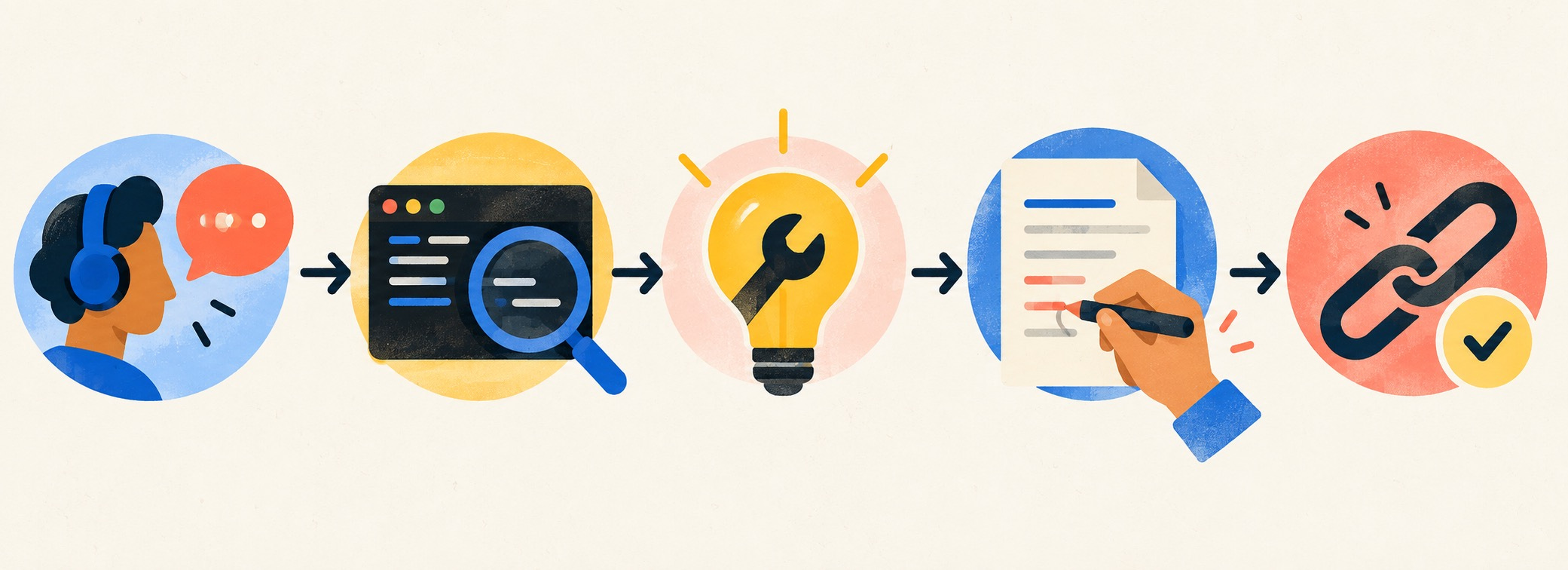
Use AI inside a sequence that preserves your responsibility. The sequence below turns one observed problem into a durable personal-brand asset.
1. Listen for a specific, costly moment
Collect the question in the words a developer used. “I cannot connect” is too broad. “I can authenticate locally but the first deploy fails when the service account reaches the project boundary” has a shape you can investigate. Preserve the language, then strip private identifiers before it enters any AI tool.
2. Reproduce or corroborate it
Do not turn a single support anecdote into public advice. Re-run the path in a safe environment, read the current documentation, or ask the owner who can verify it. If you cannot reproduce it, write the piece as an open question or do not write it yet. “I am still investigating” protects more trust than a fluent wrong answer ever will.
3. Extract the human lesson
The artifact should not just say which button to click. Find the misconception underneath: perhaps the mental model for credentials is wrong, the naming is misleading, or the first-run path hides a prerequisite. This is where your judgment lives. It is also what makes a tutorial useful after the UI changes.
4. Let AI organize—not invent
Now use AI to propose a structure, identify assumptions a reader may have, make the language plainer, or generate a test checklist. Feed it only public documentation, your sanitized notes, and facts you can stand behind. Do not ask it to fabricate a code sample, customer quote, benchmark, or success claim.
I am drafting a technical explainer for developers. Use only the verified notes below. Create a plain-language outline with: the reader’s goal, the hidden assumption, the safe first step, a minimal reproducible example placeholder, verification steps, known limits, and questions that require a human technical review. Do not invent commands, results, customer stories, or product behavior. Flag every unsupported claim.
5. Publish proof, limits, and a path back
Link primary documentation. Name the version or condition when it matters. State what you did not test. Invite developers to correct an edge case or share the setup that differs. This is not a weakness. It is a signal that you understand technical work as a conversation, not a broadcast.
Choose assets that demonstrate judgment
You do not need to produce every type of content. Choose two or three formats that make your particular kind of developer empathy visible. A short “why this setup fails” note can become a LinkedIn post, a deeper blog guide, and a talk segment—but only after the underlying lesson is sound.
Good options include a before-and-after onboarding note, an annotated minimal example, a “what changed and why” release explainer, a public office-hours recap with private details removed, a decision memo that compares two approaches, or a community spotlight where the builder—not your employer—is the hero.
What should you avoid? Rewording release notes you did not help interpret. Posting a code block you did not run. Publishing synthetic screenshots as if they document a real flow. Turning community questions into content without removing identifying context. Letting a language model answer in the brand’s voice when a developer needs a human owner.

Make your public work legible to the people who matter
A developer advocate’s brand has at least three audiences: developers deciding whether to trust you, internal teams deciding whether your feedback is grounded, and future collaborators deciding whether you understand the craft. Your profile and portfolio should help each group find evidence quickly.
Start with a narrow promise. Instead of “Developer Advocate | Speaker | Community Builder,” write the area where you reduce friction: “I help platform engineers ship reliable AI-agent integrations by turning onboarding failures into practical developer guides.” The wording can evolve. Its job is to make the connection between your expertise, audience, and useful outcome obvious.
Then maintain a proof shelf. Link three to five items that show different parts of the work: a reproducible guide, a thoughtful technical talk, a community resource, an honest postmortem, and a piece of feedback that changed a public explanation. Add a one-sentence note for each: what developer problem it addressed, what you verified, and what the reader can use.
Use AI to audit clarity across those assets, not to manufacture them. Ask it to identify jargon, missing prerequisites, vague claims, or inconsistencies in your scope. Make the decisions yourself.
A 30-day trust-building sprint
You can start without becoming a full-time content creator. For the next month, collect ten friction signals. Choose one that is recurring, safe to explain, and possible to verify. Reproduce it or get a technical owner to confirm it. Publish one small explanation with sources, limits, and a question for readers.
In week two, turn the same learning into a minimal example or checklist. In week three, use an office hour, community thread, or peer review to find the edge cases. In week four, update the piece and write a short reflection: what developers taught you, what changed, and what still needs work.
This compact loop gives you something better than content volume: a visible record of learning in public with care. That record becomes a stronger developer advocate portfolio, a sharper interview story, and a personal brand that still feels credible when AI makes publishing effortless.
Keep AI in the right role
AI is excellent at summarizing sanitized notes, finding inconsistent terminology, producing alternative outlines, turning one verified lesson into channel-specific drafts, and generating a pre-publish checklist. It is not the source of your technical authority. It cannot confirm a behavior in an environment it never ran. It cannot accept responsibility when a reader breaks something. It does not know which community detail should stay private.
Set a simple rule: every public technical claim needs a human owner, a source or test, and a stated boundary. If you cannot supply those, keep the draft in the ledger. The pause is part of the brand.
Frequently asked questions
What is personal branding for a developer advocate?
It is the public evidence that you can understand developer needs, explain technical tradeoffs, and help people move forward. A strong developer advocate personal brand is built from useful artifacts and trusted interactions, not follower counts alone.
Can developer advocates use AI to write technical content?
Yes—use it for structure, clarity, editing, and review checklists. Keep a human accountable for facts, examples, product behavior, security implications, and the final decision to publish. Never present untested generated material as verified guidance.
What should a developer advocate post on LinkedIn?
Start with a real developer question you can safely answer. Explain the hidden assumption, show the first useful step, link the source material, and name a limit or edge case. The post should help a developer even if they never become a customer.
How do I build a DevRel portfolio with no official developer advocate job?
Create public proof around a tool or community you genuinely use: a verified tutorial, an improved onboarding note, a helpful event recap, a small open-source contribution, or a documented answer to a recurring question. Explain your process and what changed after feedback.
How often should a developer advocate publish content?
Publish at the pace you can verify and sustain. One deeply useful explanation updated after community feedback is more valuable than several polished summaries that do not help anyone ship. Let recurring friction determine the cadence.
How can I avoid sounding like an AI-generated developer influencer?
Keep the traces of real work: a specific problem, a source, an observed constraint, a tested step, an honest limitation, and a human point of view. Avoid vague certainty, invented results, and comments that add no technical value.
Further reading: Google’s people-first content guidance, GitHub’s AI content guidance for community answers, LinkedIn’s developer AI policy, and the State of Developer Relations survey.