


For technical professionals, the strongest personal brand asset is often not another opinion post. It is a profile that makes your judgment, range, and proof of work obvious in under two minutes.

A technical personal brand is easier to trust when the proof is visible, organized, and easy to scan.
The fastest way to weaken a technical personal brand is to publish more opinion than evidence. In an AI-saturated market, that is happening everywhere. Feeds are full of polished takes, auto-written threads, and recycled prompts. What people still struggle to fake well is a clear public record of what they build, how they think, and what kind of technical judgment they apply.
That is why GitHub matters more than many developers realize. Not because recruiters are sitting around reading your code line by line. Most are not. But hiring managers, technical founders, collaborators, open-source maintainers, and serious clients often use GitHub as a quick credibility check. They are not asking, “Is this person famous?” They are asking, “Is this person real?”
If your GitHub profile looks like a dumping ground, you lose the moment. If it looks too polished and strangely empty, you also lose. The opportunity is to turn GitHub into a trust-building surface that feels alive, practical, and easy to understand.
GitHub’s own documentation explicitly frames your profile as a public showcase of your work, contributions, and information you choose to share, and recommends a profile README plus 3 to 5 pinned projects when you want hiring managers to understand your skills quickly.
Why GitHub has become a personal branding surface
GitHub is no longer just a code warehouse. It is part portfolio, part proof archive, part reputation graph. That shift matters even more for AI builders because the market is crowded with people who can describe AI systems but cannot show what they have shipped, tested, or improved.
GitHub’s Octoverse 2024 report noted that developers created over 70,000 new public and open source generative AI projects in 2024 and that the total number of public generative AI projects on GitHub grew 98% year over year. That means two things at once: there is far more public evidence available, and it is far easier to get lost in the noise.
At the same time, the 2024 Stack Overflow Developer Survey found that most developers code outside work as a hobby and that almost 40% code outside work for professional development or self-paced learning. In other words, there is a huge pool of public side work, experiments, notebooks, libraries, and demos that could support a personal brand if they were packaged well.
The branding mistake is assuming visibility comes from volume. For technical people, visibility usually comes from legibility. Your profile does not need to show everything. It needs to make the right things obvious.
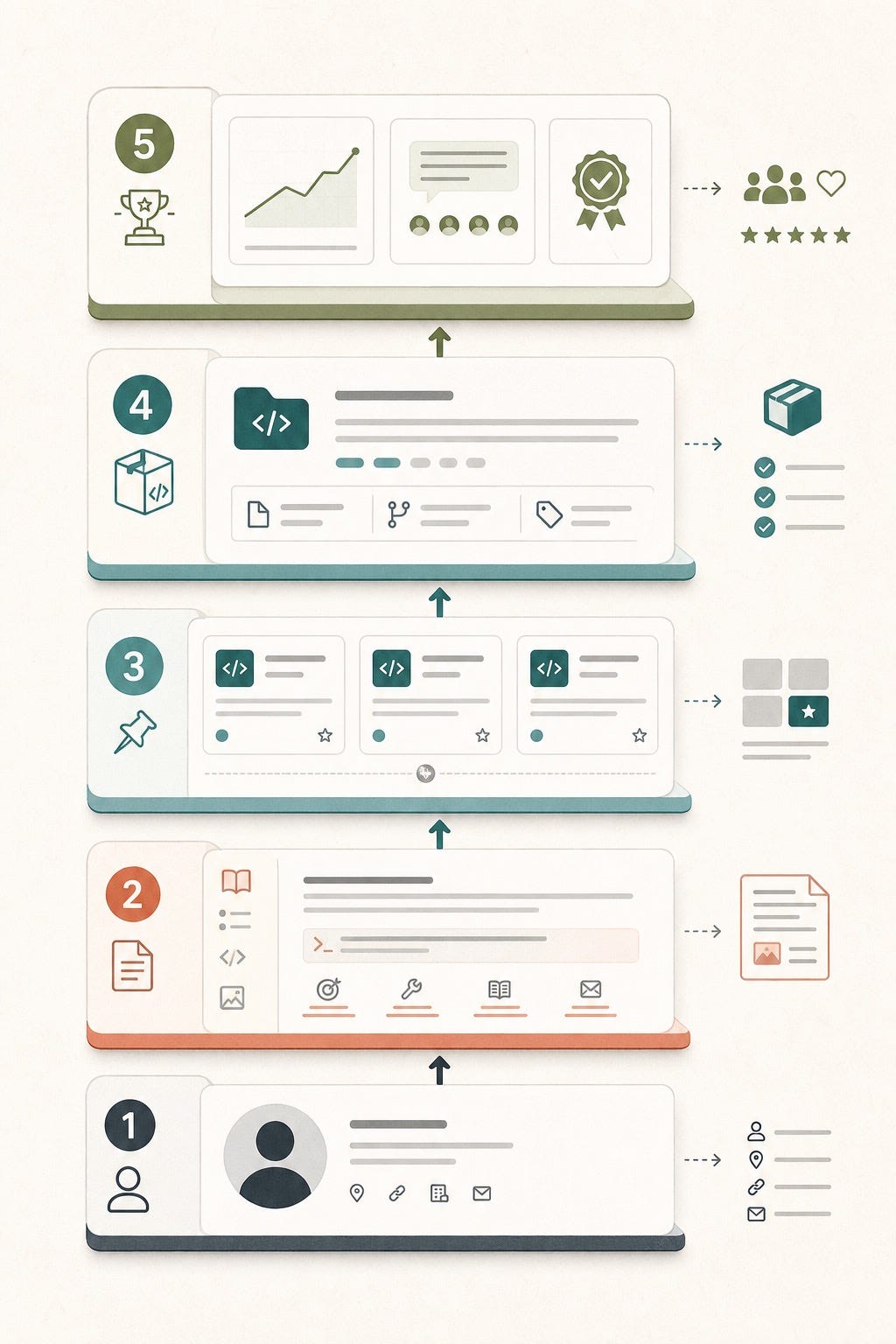
The goal is not to look busy. The goal is to make your best technical evidence easy to trust.
What serious visitors actually look for
Reddit discussions about GitHub portfolios are useful because they remove the fantasy. The consistent pattern is not that “everyone checks GitHub.” It is more specific. Recruiters often do not inspect deeply. Hiring managers sometimes do. Engineers and technical interviewers are the most likely to care when your profile becomes relevant.
That changes how you should design the page. Your GitHub profile is not a mass-audience channel. It is a decision-support surface. Someone lands there because they are already curious about you. They want a fast answer to a few questions:
What kind of technical problems do you work on?
Can you explain your projects clearly, or only build them?
Do you finish things, document them, and make them usable?
Do you have taste in what you choose to highlight?
Does your public work match the identity you claim elsewhere?
If your LinkedIn says “AI engineer building production agent systems” but your GitHub is six abandoned tutorials and no context, the inconsistency damages trust. If your GitHub instead shows one clear retrieval project, one evaluation repo, one useful automation tool, and one thoughtful open-source contribution, your brand suddenly feels credible.
The five layers of a strong GitHub personal brand
1. A bio that positions, not just labels
Your bio should not try to tell your whole story. It should help someone categorize you quickly. “Software engineer” is accurate but weak. “Building retrieval, agent, and workflow tools for internal knowledge systems” is much more useful. It gives the visitor a map.
GitHub also lets you add links, location, and other profile details. Use them to reduce ambiguity, not to create clutter. One strong website or newsletter link is better than a pile of scattered destinations.
2. A profile README that gives context
This is the most underused personal branding asset on GitHub. A good profile README explains what you work on, what you are learning, what you want to be known for, and which projects deserve attention first. It turns a profile from a list into a narrative.
GitHub’s own resume guide suggests using the profile README for your introduction, skills, experience, best projects, and achievements. For personal branding, I would add one more element: point of view. What kind of builder are you? Fast prototyper? Systems thinker? Practical open-source educator? Reliability-first ML engineer? Give the visitor language for remembering you.
3. Pinned repositories that tell a story
You can pin up to six items, but the bigger question is what story they tell together. Most people pin whatever has the highest stars or whatever looks newest. That is lazy positioning.
Instead, build a set with range:
One project that shows your core niche.
One project that shows product or user empathy.
One project that shows collaboration or open-source contribution.
One project that shows technical depth or systems thinking.
One project that shows taste in documentation, demo quality, or developer experience.
A good pinned set makes your brand feel intentional. It says, “Here is the shape of my work,” without forcing anyone to guess.
4. Repository packaging that respects the visitor’s time
GitHub’s resume tutorial makes an important point: many evaluators will look for only a couple of minutes. That means your repository has to be instantly readable. A helpful README, a short project description, topic tags, setup instructions, and a demo link do more for your personal brand than a fancy banner image ever will.
This is where many strong developers lose leverage. Their code may be solid, but the repo asks too much from the reader. If a visitor cannot understand what the project does, why it exists, what makes it useful, and how to try it, your proof stays trapped.
5. Public proof that feels human
You do not need a fake “clean room” GitHub. In fact, many technical people worry too much about looking messy. Real work is messy. The better goal is interpretable mess. You want enough signal that someone can see progress, iteration, problem solving, and learning.
That means it is fine if not every commit is perfect. What matters is that the repos you choose to highlight feel alive, documented, and coherent. A little imperfection plus strong explanation beats sterile emptiness every time.
An AI-assisted workflow to upgrade your GitHub brand in one afternoon
AI is helpful here, but not as a replacement for judgment. Use it as an editorial assistant, packaging assistant, and consistency checker.
List every public repo you actually want tied to your identity. Archive, privatize, or unpin the rest.
Ask an AI tool to summarize each shortlisted repo in plain English: what it does, who it helps, what is technically interesting, and what result it proves.
Rewrite those summaries yourself until they sound like you and match the kind of opportunities you want.
Use AI to draft or improve READMEs, then edit for accuracy, specificity, and restraint.
Generate a first draft of your profile README with sections for focus areas, current work, selected projects, and ways to contact you.
Ask AI to look for inconsistencies across your GitHub bio, README, pinned repos, website, and LinkedIn headline.
Add demos, screenshots, architecture notes, or usage examples where the repos feel too abstract.
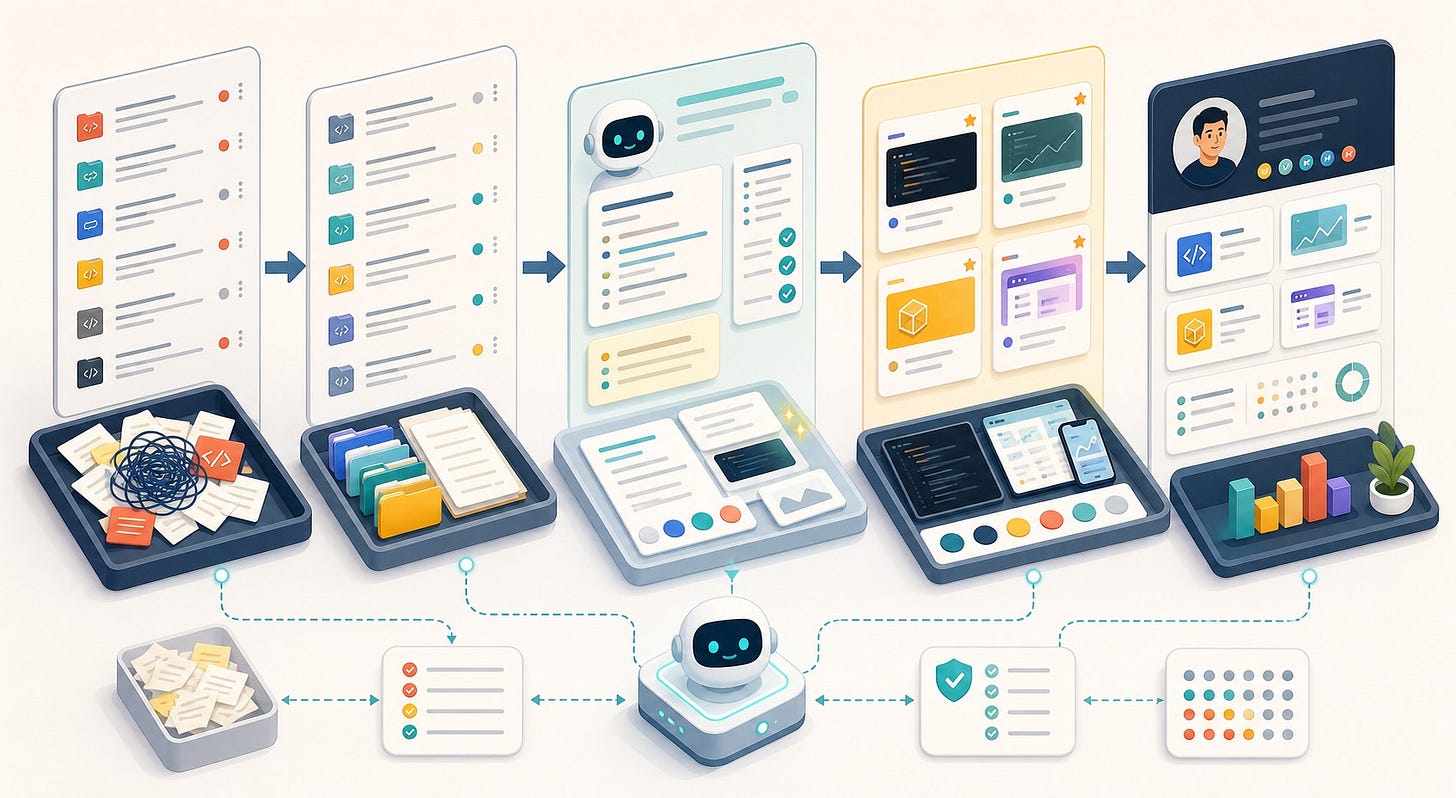
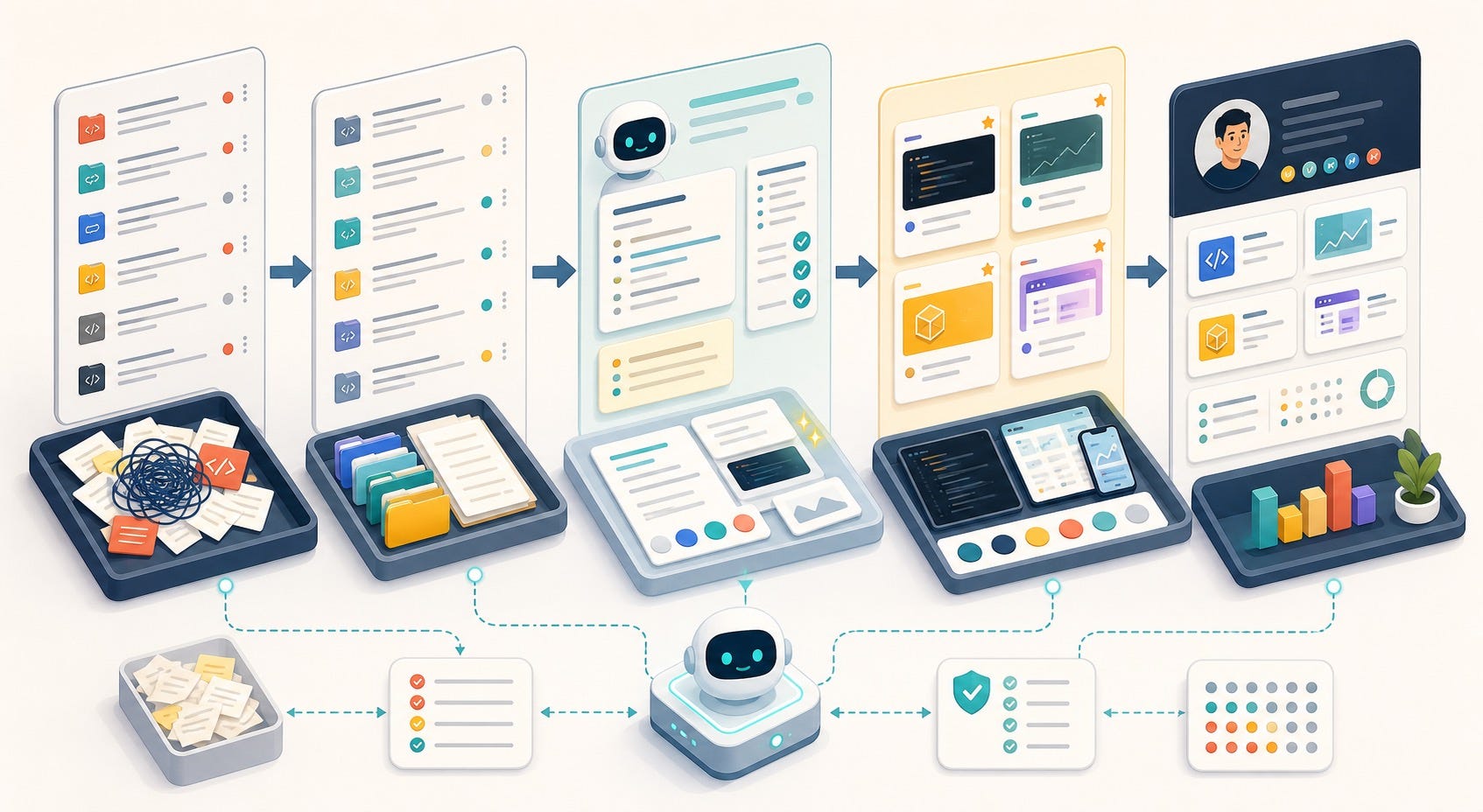
The best AI use here is not to invent credibility. It is to package real work so people can understand it fast.
If you want a simple prompt, try this:
“Review this repository as if you were a busy hiring manager evaluating my technical credibility in 90 seconds. Tell me what is clear, what is confusing, what proof is missing, and how the README and project description should change.”
That prompt does two useful things. It forces AI to optimize for the reader’s time, and it shifts your thinking from “How do I sound impressive?” to “How do I make this easy to trust?”
Mistakes that weaken a GitHub-based personal brand
Using the profile README like a sticker wall instead of a positioning tool.
Pinning random repos with no story or relevance.
Highlighting only toy projects when you have better real-world evidence.
Letting half-finished repos stay public without context.
Writing vague README files that say what the app is, but not why it matters.
Overusing AI-generated wording that sounds polished but says nothing specific.
Optimizing for stars instead of fit. A niche tool that proves judgment can do more for your brand than a trendy clone.
The last point matters most. Personal branding is not a popularity contest. For technical professionals, it is often a fit-and-trust problem. The right person should land on your profile and immediately think, “Yes, this matches what we need.”
A simple 30-day maintenance system
You do not need to become a full-time content creator to keep this useful. A lightweight monthly rhythm is enough:
Review your pinned repos once a month and replace anything that no longer represents your best work.
Update one README each week, especially for projects you actively share.
Add one short note in your profile README about what you are currently building or learning.
When you finish an experiment, turn the result into one clean public artifact: a repo, a demo, a write-up, or an issue summary.
Use AI to audit consistency across GitHub, LinkedIn, your website, and your newsletter every few weeks.
Over time, that turns GitHub from a passive archive into a quiet authority engine. You do not need constant posting. You need a credible public trail.
The real goal
The point of GitHub personal branding is not to cosplay as a louder version of yourself. It is to make your technical identity easier to understand. In a market full of AI-generated sameness, that is a serious advantage.
If your work is real, your profile should make that reality legible. Better wording helps. Better pins help. Better READMEs help. But the deepest advantage comes from building a brand around proof instead of performance.
FAQ
Do recruiters actually look at GitHub profiles?
Often not in depth. The more relevant audience is hiring managers, technical interviewers, founders, and collaborators who want a fast credibility check. That is why clarity matters more than code volume.
What should I put in a GitHub profile README for personal branding?
Include a concise introduction, your focus areas, selected projects, the kind of problems you solve, and where someone should go next. Use it to create context, not decoration.
How many repositories should I pin on GitHub?
Usually 3 to 6. Pick enough to show range, but not so many that the story gets muddy. Your pinned set should help someone understand your niche, strengths, and style quickly.
Can I use AI to improve my GitHub profile without hurting trust?
Yes, if AI is helping you clarify, summarize, and package real work. No, if it is inventing achievements, over-polishing your voice, or turning everything into generic marketing language.
Should I hide messy or unfinished projects?
Not always. Messy public work can still be useful if it teaches something or shows iteration. The key is to choose what you highlight and add enough explanation that visitors understand what they are seeing.
Is GitHub enough for a technical personal brand?
No, but it can be one of the strongest proof layers. GitHub works best when it supports a broader identity across LinkedIn, a website, speaking, writing, or open community participation.
Search description: A practical guide for AI builders, developers, and technical professionals who want to turn a GitHub profile into a trust-building personal brand asset with better READMEs, pinned repos, and AI-assisted proof of work.