


The tiny CR badge on LinkedIn is not just a metadata detail. It is part of a bigger shift in how professionals prove what is real, what is edited, and what deserves trust.
For founders, consultants, creators, executives, freelancers, and job seekers building a professional identity in an AI-shaped internet.

Most people still think personal branding is about looking polished. Better headshot. Better banner. Better posts. Better design. But the game is changing. Now the question is not just whether your content looks good. It is whether your audience believes what they are seeing.
That is why LinkedIn Content Credentials matter. LinkedIn says image and video content signed with C2PA Content Credentials is marked with a C2PA icon, and that clicking the label reveals origin and edit metadata. Adobe has gone further by making its Content Authenticity app publicly available and tying it to Verified on LinkedIn, which lets creators connect verified identity to digital work. Meanwhile, the European Commission says transparency obligations under Article 50 of the AI Act begin applying on August 2, 2026. Provenance is moving from niche technical standard to visible professional signal.
If you use AI-assisted visuals, edit your own images, publish design-heavy posts, or rely on visual proof to build trust, you need a position on this now. Not a legal memo. Not a moral panic. A working strategy.
What LinkedIn Content Credentials Actually Tell People
At the simplest level, Content Credentials are a cryptographically signed record about how a piece of media was created or edited. LinkedIn describes them as a way to make origin and history more accessible. Adobe frames them like a digital signature that can carry attribution, verified identity, and creation details.
That matters because viewers are already reading the CR icon as a trust clue, even when they do not fully understand the technical standard behind it. In Reddit threads about the CR mark, people ask whether it means something is AI-generated, whether it makes a post look suspicious, or whether it can appear on non-AI assets too. That confusion is precisely why personal branding strategy matters here. The label does not speak for you. It only creates a moment of interpretation.
What the CR icon usually does in practice:
It slows down blind trust.
It invites a closer look at how a visual was made.
It gives honest creators a way to attach provenance instead of hiding process.
It makes weak, overly synthetic visual choices easier to question.
Why This Matters More Than Another AI Disclosure Debate
The AI disclosure conversation often gets stuck in a shallow question: should you admit you used AI? That is too vague to be useful. Most professionals do not need to write confessions under every post. But they do need to understand where hidden synthetic polish creates unnecessary doubt.
LinkedIn’s own trust data helps explain why. In its Verified on LinkedIn announcement, the company said 65 percent of people worry about who to trust online, and more than 80 million members have already verified on LinkedIn. Adobe reported that 91 percent of creative professionals want a reliable way to attach attribution to their work. The pattern is clear. People are not asking for performative purity. They want stronger signals that a real person stands behind the work.
The new trust advantage is not looking untouched. It is looking accountable.
That is good news for serious professionals. You do not need to abandon AI-assisted workflows. You need to use them in a way that leaves more evidence of judgment, authorship, and intent.
When Content Credentials Help Your Personal Brand
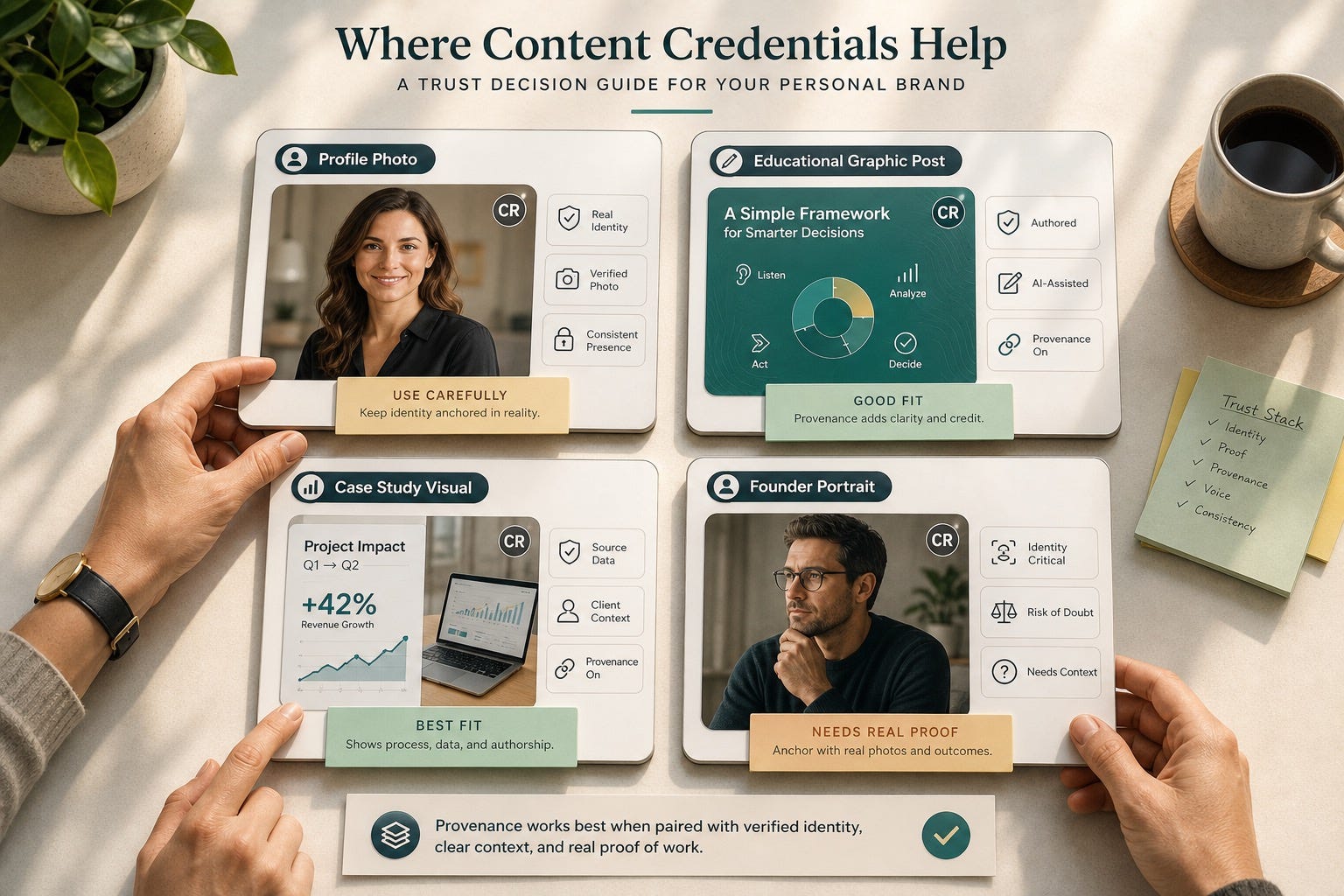
Content Credentials help when the asset itself is part of your credibility. Think visual posts about your work, a founder photo essay, a design case-study image, a product concept mockup, a branded explainer, or a thought-leadership graphic that you want people to trust and share.
1. When authorship matters
If you are a designer, photographer, marketer, creative technologist, or visual storyteller, provenance can reinforce the fact that this work came from you. Adobe’s public beta explicitly supports attaching creator details and verified identity, which is useful when your name itself is part of the asset’s value.
2. When you want AI assistance without sneaking it in
A light AI edit, generative fill, cleanup pass, or stylized visual concept is not automatically a trust problem. The problem starts when the image is doing heavy credibility work while trying to pass as something it is not. Provenance gives you a middle path: use the tool, keep the authorship, avoid the cover-up energy.
3. When your audience is already skeptical
Consulting, recruiting, leadership coaching, B2B services, hiring, and creative services are trust-intensive markets. In those contexts, a provenance signal can work like a seatbelt. It does not create trust by itself, but it lowers the odds that a viewer feels quietly misled.
When the CR Icon Can Backfire
The icon is not magic. If the underlying asset is weak, provenance can make the weakness more visible.
It backfires when the visual is doing too much identity work
Your primary profile photo, executive leadership image, or professional About-page portrait should usually anchor in reality. If the face is heavily altered, idealized, or stylized, Content Credentials may not save it. It may simply make viewers ask harder questions.
It backfires when the image is prettier than your proof
If your posts look cinematic but your profile has no case studies, no specific outcomes, no client language, no examples, and no grounded point of view, provenance will not fix the mismatch. Trust comes from alignment. The image, profile, and proof all need to tell the same story.
It backfires when you treat it like a loophole
Some creators are already looking for ways to strip or avoid provenance labels. That is usually the wrong instinct for a personal brand. If your strategy depends on avoiding context, the issue is probably not the badge. It is the asset choice.
A Better Model: Build a Trust Stack, Not a Label Strategy
Strong personal brands do not rely on one signal. They stack multiple forms of credibility so no single element has to carry the whole burden.
A practical trust stack for AI-assisted personal branding:
A real, current identity anchor such as a natural headshot, live video, or verified profile.
Visible proof of work such as case studies, screenshots, artifacts, portfolio samples, or outcomes.
Clear attribution and provenance on visual assets that benefit from context.
Specific writing that sounds like a person with stakes, not a polished content machine.
Consistent cross-surface details so your profile, website, bio, and posts reinforce each other.
Notice what this does. It lowers the pressure on any single image to perform trust by itself. That is the real win. Content Credentials should support credibility, not replace it.
How to Use LinkedIn Content Credentials Intentionally
For founders and executives
Use provenance on thought-leadership visuals, product explainers, team storytelling, or process graphics. Be more conservative with your main portrait. Your public identity should feel unmistakably like you when someone later meets you on a call, in a room, or in a press mention.
For consultants and freelancers
Use provenance when publishing frameworks, diagrams, audit visuals, before-and-after examples, or educational posts that show how you think. Pair those visuals with strong captions that explain what is original, what was edited, and what the reader should notice.
For creators and marketers
If experimentation is part of your brand, provenance can help. It signals that you are not trying to smuggle synthetic polish in as raw authenticity. The key is to connect the image back to a real perspective, a tested insight, or original reporting.
For job seekers
Be careful about using heavily generated visuals in places where employers expect identity clarity. A lightly improved real headshot is usually safer than a fully synthetic version. If you use AI-assisted visuals elsewhere, make sure the rest of your profile carries concrete proof such as projects, recommendations, featured work, and role-specific examples.
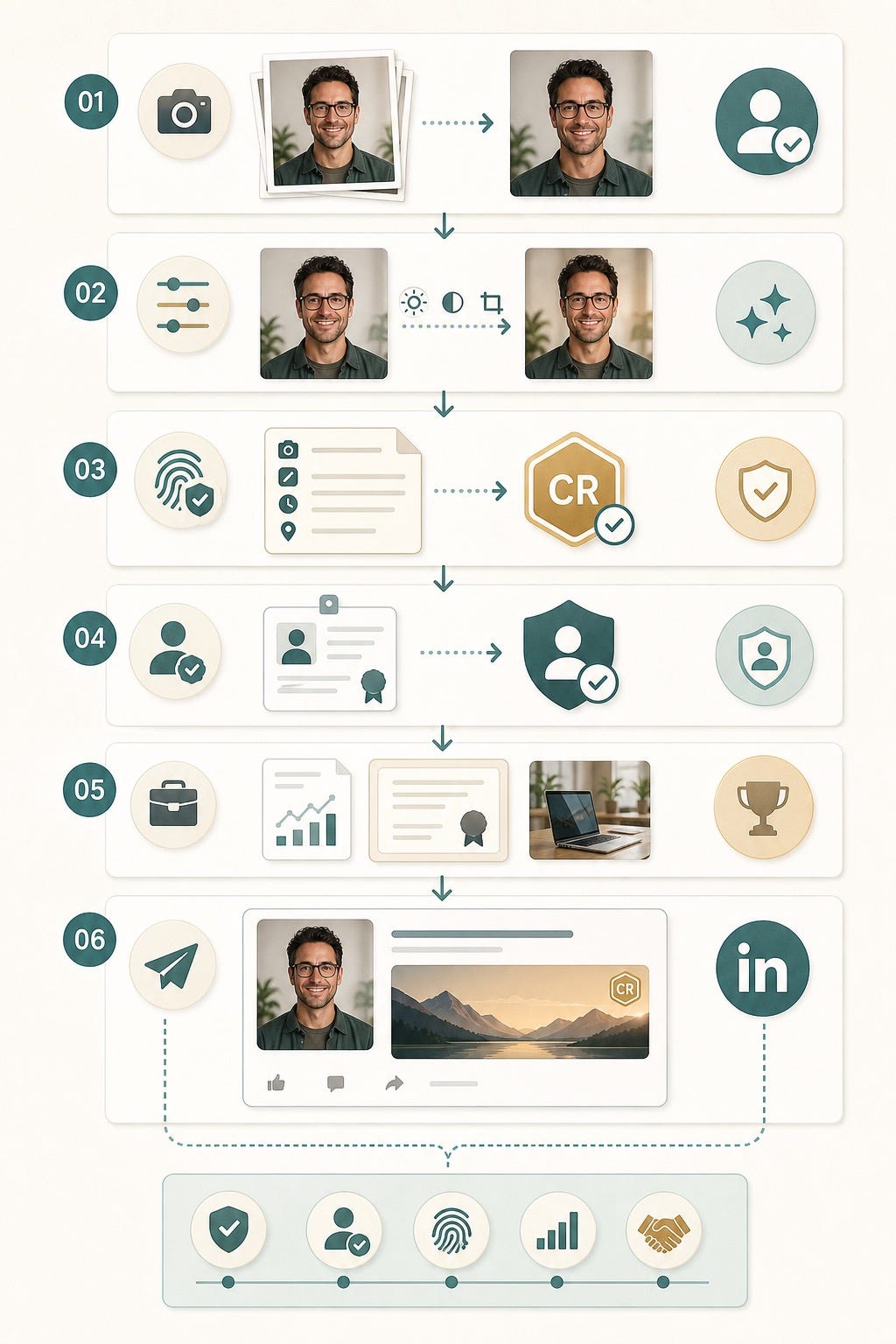
A Simple Workflow You Can Run This Week
Here is a practical system that keeps the benefits of AI without making your brand feel engineered.
Step 1: Separate identity assets from idea assets
Your profile photo, speaker headshot, and leadership-page photo are identity assets. Treat them conservatively. Carousels, concept visuals, diagrams, event recaps, and educational graphics are idea assets. These are better candidates for provenance and transparent AI assistance.
Step 2: Verify what can be verified
If Verified on LinkedIn is available to you, use it. LinkedIn is clearly moving toward a world where identity verification and media provenance support each other. Verified identity does not make every post persuasive, but it removes unnecessary doubt.
Step 3: Attach provenance where it adds context
If you use Adobe’s Content Authenticity workflow or another compatible system, attach provenance to visuals that benefit from authorship, attribution, or process clarity. This is especially useful when your work may be reposted, remixed, or detached from its original caption.
Step 4: Add one human sentence of framing
Do not let metadata do all the work. A simple line such as “Concept visual I built to explain our process” or “Real photo, lightly edited for clarity” often does more for trust than a defensive paragraph.
Step 5: Back the visual with proof
The post should link to something firmer: a case study, a result, a product demo, a client lesson, a hiring insight, a talk, a repo, a workshop, or a clear professional opinion. Provenance works best when it introduces substance instead of compensating for its absence.
What Not to Do
Do not use obviously synthetic executive portraits and assume a provenance label will neutralize the discomfort.
Do not obsess over removing the CR icon while ignoring the bigger question of whether the asset fits your real reputation.
Do not publish generic AI visuals with no proof, no context, and no original point of view.
Do not confuse authenticity with rawness. Careful editing is fine. Misleading identity theater is the problem.
Do not let your visual brand outrun your actual body of work.
The Strategic Shift
For years, personal branding advice rewarded polish first and proof second. AI accelerated that mistake. Now anyone can generate authority-looking assets. That means trust is moving one layer deeper. The professionals who win will not be the ones who look the most flawless. They will be the ones who make authorship, judgment, and evidence easiest to verify.
LinkedIn Content Credentials are part of that shift. Not because the CR icon is powerful on its own, but because it represents the next standard readers will quietly use when deciding whether your visual identity feels credible. If you treat provenance as one component of a larger trust stack, you can use AI tools more confidently and build a brand that still feels like a real person made it.
FAQ
What does the CR icon mean on LinkedIn?
It indicates the image or video carries C2PA Content Credentials. On LinkedIn, clicking the label can reveal available metadata about the content’s origin and edits.
Does the CR icon always mean a post was fully generated by AI?
No. It can also appear on content that was edited or exported through tools that attach provenance metadata. That is why interpretation matters. The badge is context, not a complete verdict.
Should I avoid using AI headshots if I care about personal-brand trust?
Usually avoid heavily synthetic portraits for your main identity surfaces. A lightly improved real photo is safer than a polished image that makes people wonder whether they are looking at you or a version of you.
Can Content Credentials help creators and consultants, not just photographers?
Yes. If visual posts are part of how you teach, explain, or demonstrate expertise, provenance can support attribution and trust, especially when your content gets shared outside its original caption.
Do I still need verification or proof assets if I use Content Credentials?
Absolutely. Provenance is one trust signal. It works best alongside profile verification, clear positioning, real examples, recommendations, case studies, and consistent identity details across your channels.
Will transparency rules make this more important soon?
Yes. The European Commission says transparency obligations under Article 50 of the AI Act apply from August 2, 2026. Even outside formal compliance, audience expectations are moving toward more visible context around synthetic media.