


Most consultants treat LinkedIn’s Services Page like a small profile setting. That is why it underperforms. Used well, it becomes a trust filter that helps the right people understand what you do, what proof you have, and whether they should talk to you at all.
For consultants, fractional leaders, freelancers, coaches, strategists, and technical experts building a stronger public reputation with AI.

If you sell expertise, your personal brand does not fail because people have never heard of you. It usually fails one step later. People land on your profile, see enough to stay curious, but not enough to feel certain. Your headline may be decent. Your About section may be polished. Your Featured section may hold a few links. But the buyer still has to do extra work to understand your offer, your fit, and your proof.
That friction matters. LinkedIn says its Service Pages are free landing pages that showcase services, and the platform also says 82% of people hiring a service provider value referrals from their professional network most. That tells you what the page is really for. It is not a magic lead engine. It is a reputation bridge between “someone mentioned your name” and “I trust you enough to ask for help.”
The mistake is treating the Services Page like a marketplace profile. The better move is to treat it like a trust surface. Your goal is not maximum volume. Your goal is faster belief from the right people and faster self-selection from the wrong ones.
Why this small LinkedIn surface matters more than most people think
The Services Page sits close to intent. A visitor who opens it is no longer just browsing your ideas. They are trying to connect your credibility to a real problem. That makes it different from a post, a banner, or even a featured link.
LinkedIn’s help documentation shows that service providers can add media, collect reviews, respond to service requests, and manage projects from a personal services admin view. In other words, the page is one of the few places where positioning, proof, and action live together. For a personal brand, that combination is unusually valuable.
Your Services Page should answer three buyer questions in under thirty seconds: what do you solve, why should I trust you, and what kind of engagement fits you best?
This is especially important now because AI has made polished profiles cheap. A buyer can assume your headline was improved by AI. They can assume your About section was edited with ChatGPT. They can assume your posts were assisted. That does not mean AI is bad. It means your credibility now depends on structure, not polish alone. The Services Page gives you a place to structure trust.
What most people get wrong
Most weak Services Pages fail in one of four ways.
They are too broad. “Marketing consultant,” “AI strategist,” or “business advisor” says almost nothing.
They copy website copy. That usually means bloated language, vague benefits, and zero buyer filtering.
They depend on claims instead of proof. Everyone says they help clients grow, scale, optimize, or transform.
They invite everyone. That sounds generous, but it makes the page feel less credible and creates more bad-fit inquiries.
Reddit threads about LinkedIn Services Pages show a pattern: people either get poor requests or no requests, then conclude the feature is useless. Often the real problem is not the feature. It is that the page does not tell the truth clearly enough. A vague page attracts noise. A specific page earns trust, even when inquiry volume stays modest.
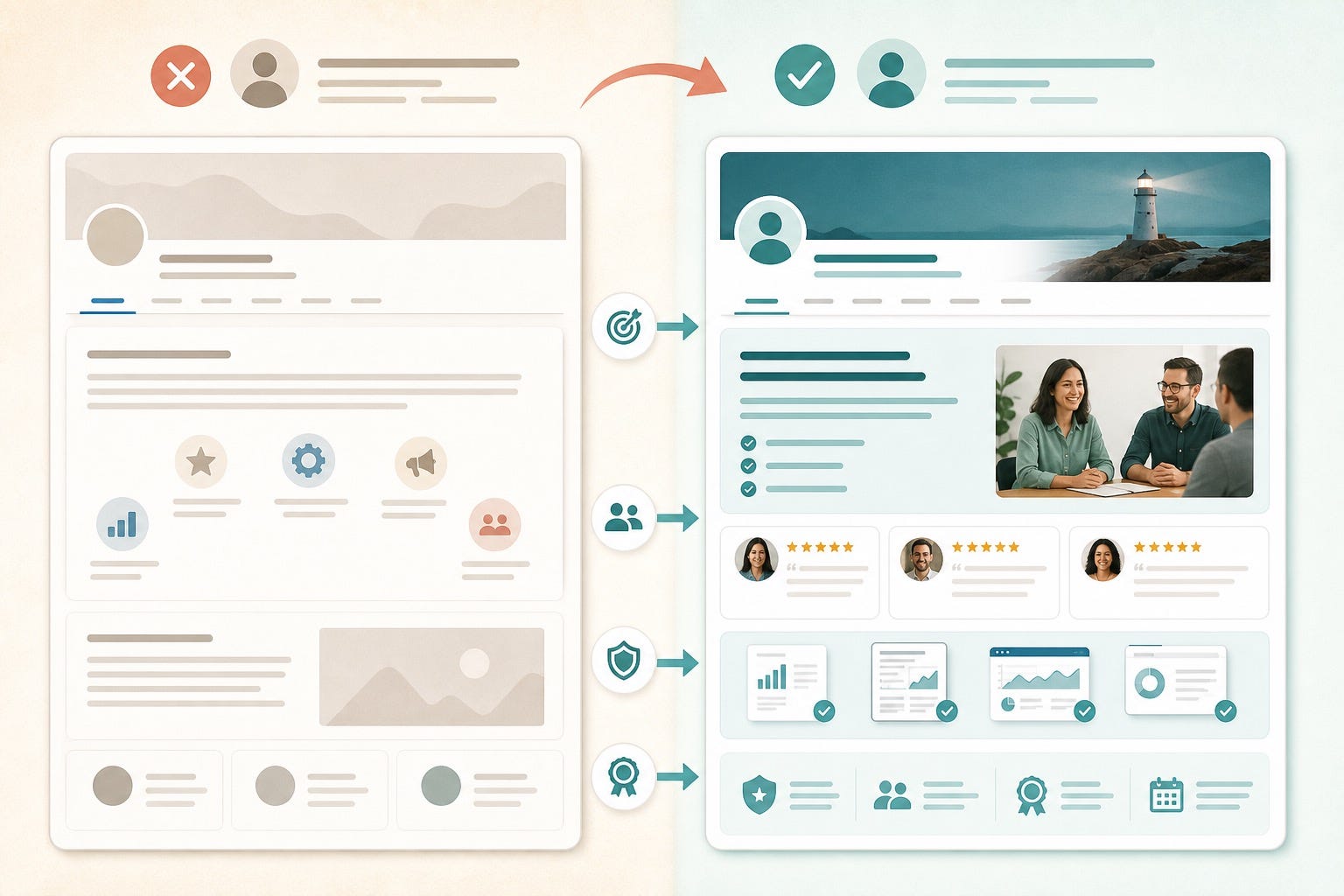
The trust-first structure that works
1. Name the problem, not just the role
“Fractional CMO” is a title. “Helps B2B SaaS companies fix weak demo-to-pipeline messaging” is a problem frame. The second version is more trustworthy because it shows judgment. Buyers do not want a category. They want evidence that you understand the pain they already feel.
AI can help here. Ask your model to review your last ten client calls, proposals, testimonials, or discovery notes and extract the repeated problem language. Then compress that into one service sentence that sounds like a real buyer, not a consultant brochure.
2. Use categories carefully
It is tempting to list everything you can do. Do not. Your Services Page is not your hidden skills inventory. It is your public positioning layer. Select the service categories that reinforce the work you most want to be known for. If you do strategy, workshops, execution, and recruiting, resist the urge to lump them all together unless they support one clear promise.
Personal branding gets stronger when recognition compounds. That means repetition matters. If your profile says one thing, your content says another, and your Services Page lists six unrelated offers, you have made yourself harder to trust.
3. Add proof that reduces imagination
The best proof assets make the buyer imagine less. They can be short case summaries, anonymized before-and-after snapshots, frameworks, teardown posts, sample deliverables, or a concise explanation of your process. LinkedIn lets providers add media to Service Pages. Use that space to show thinking, not decoration.
A simple rule helps: every proof asset should answer one silent objection. “Do they understand my type of problem?” “Can they explain clearly?” “Have they done this before?” “Will they waste my time?” Build your media around those objections.
4. Treat reviews like reputation architecture
LinkedIn’s Service Pages support reviews, and that matters because reviews on this surface sit close to the moment of evaluation. But not all reviews help equally. “Great to work with” is pleasant and weak. “Clarified our positioning in two sessions and fixed the homepage messaging that was killing conversions” is useful.
Use AI to help clients leave better reviews without scripting their voice. After a project, ask the model to draft three short review prompts based on actual outcomes, decisions, and process moments. Then send those prompts to the client as optional memory-joggers. The point is not to manufacture praise. It is to make the truth easier to recall.
How AI can improve the page without making it feel synthetic
AI is most useful when it sharpens signal. It is least useful when it writes a page that sounds like every other page. Here is the workflow I recommend.
Use AI to cluster buyer language from calls, messages, and testimonials.
Use AI to identify repeated proof points and strongest outcomes.
Use AI to generate three versions of your service summary: plainspoken, premium, and technical.
Use AI to shorten jargon until the page sounds natural when read aloud.
Use AI to draft review-request prompts that focus on specifics, not praise.
What AI should not do is invent confidence. If you have not earned a claim, leave it out. If your offer is still changing, say what stage you are in. If your case studies are thin, publish one sharp proof asset instead of eight polished abstractions. Buyers can usually feel the difference.

A practical page blueprint for consultants and solo experts
If you want a starting point, build your Services Page around this order.
Service promise: one sentence that names the problem, audience, and outcome.
Qualification cue: one sentence that says who you are best for and who you are not for.
Proof stack: two to four assets that show process, outcomes, or thinking.
Review design: a handful of specific reviews tied to real work categories.
Call-to-action: a low-friction next step with enough context that buyers do not arrive confused.
Notice what is missing: hype. You do not need “results-driven” language or inflated authority claims. Personal branding is stronger when your page makes a quiet, defensible case. The more your page sounds like a proposal before the proposal, the better.
How to filter bad-fit leads on purpose
This is the part many people skip because they are afraid fewer inquiries means less opportunity. In practice, the opposite is often true. A page that names fit clearly tends to create better conversations.
If you only work with B2B teams above a certain size, say so. If you do not offer implementation, say so. If your best work happens in strategy sprints, not ongoing retainers, say so. Clarity is not friction. Clarity is respect.
Your personal brand should not just attract attention. It should reduce mismatch. That is one reason LinkedIn’s Services Page can outperform random posting as a trust tool. It speaks to intent, not just awareness.
Why this matters for long-term personal branding
A strong personal brand is not a pile of content. It is a system of recognizable signals. Some signals create discovery. Others create belief. The Services Page belongs in the second category.
When someone hears your name on a podcast, sees your comment under a smart post, or gets referred to you by a mutual connection, they need somewhere to verify the story quickly. A good Services Page helps them do that. It turns “I have heard of this person” into “I understand what they do and why people trust them.”
That is the deeper point. The page is not just for transactions. It is for coherence. In an AI-heavy professional internet, coherence is becoming one of the clearest trust signals available.
What to do this week
Open your Services Page and audit it with one brutal question: would a good-fit buyer understand your value, your proof, and your boundaries in under thirty seconds? If not, fix the page before you post again.
Start small. Tighten your service sentence. Remove one vague category. Add one proof asset. Request one better review. Use AI to sharpen the language, not replace your judgment. That is how a neglected LinkedIn tab becomes a serious personal-brand asset.
FAQ
Does a LinkedIn Services Page actually work for personal branding?
Yes, but not because it floods you with leads. It works because it gives high-intent visitors a structured place to evaluate your expertise, proof, and fit. Think of it as a trust asset first and a lead surface second.
What should I put on a LinkedIn Services Page?
Include a clear service promise, a specific audience, qualification cues, proof assets, and reviews tied to real outcomes. Avoid broad claims and generic consultant language.
How many services should I list on LinkedIn?
Usually fewer than you are tempted to list. Choose the categories that reinforce what you most want to be known for. A narrower page often creates a stronger personal brand because it feels more believable.
Can AI help me improve my LinkedIn Services Page?
Yes. AI is useful for extracting buyer language, summarizing proof points, drafting options, and improving review-request prompts. It is not useful when it turns your page into polished generic copy.
How do I get better LinkedIn service reviews?
Ask soon after a project milestone, and give the client optional prompts that focus on specifics such as the problem solved, the result achieved, or the decision-making process. Better prompts usually create more credible reviews.
Is a LinkedIn Services Page only for freelancers?
No. It is also useful for fractional executives, independent consultants, coaches, strategists, solo agency founders, and technical experts who sell scoped expertise through reputation.